
What does Jetstream show during a flight?
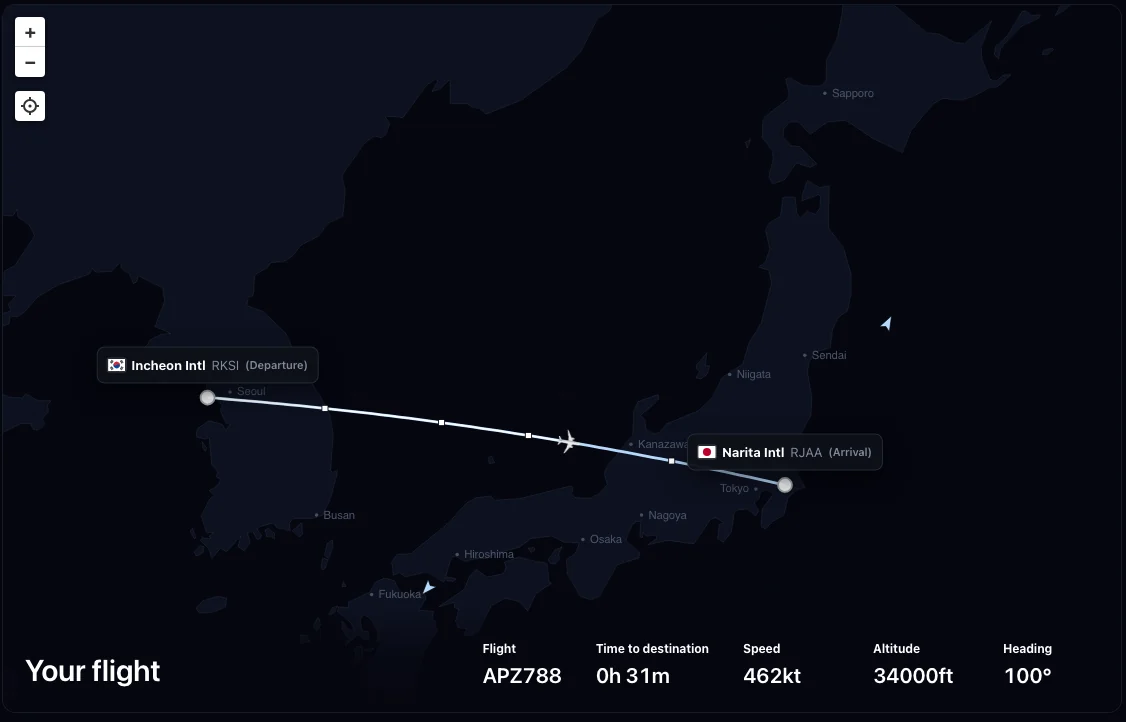
The live view puts the departure, arrival, route line, current aircraft, and essential simulator values in one place. The exact visible values depend on flight state, but the current product can surface:
How does Jetstream grade an MSFS flight?
During a career flight, Jetstream samples simulator measurements about once per second and keeps a bounded local retry journal. Compact batches are sent around important flight-phase, safety, and touchdown events, or otherwise on a five-minute heartbeat.
The grading record can include evidence that is tracked without being shown as a live-map value: pitch, bank, G force, on-ground state, selected lights, gear and flap configuration, pause, slew, time acceleration, and implausible movement. The backend uses bounded evidence to check takeoff and landing, route coverage or diversion, aircraft identity, simulator generation, warnings, and other grading inputs. It returns the authoritative grade and reward rather than accepting those values from the client.
The current grade uses a 0–100 scale. Detailed switch-state evidence is deeper for specifically supported aircraft families; generic aircraft still provide the standard simulator variables available through SimConnect.
What can other pilots see on the live map?
While an active leg is being flown, Jetstream can publish one temporary presence marker. Other signed-in pilots may see the public username, callsign, aircraft, rank, member number, departure, arrival, current in-sim position, and heading.
The marker is refreshed at most once per minute. The current backend uses one recent query capped at 500 markers and excludes entries older than five minutes. It replaces the private account path with a session-scoped marker ID and does not return the Firebase account ID or retain a flight-position history from that presence feed.
What remains after the flight?
While the flight is active, raw telemetry batches are converted into one bounded running summary and discarded. That active summary may retain up to 720 downsampled coordinate points for an administrator-only development preview; those points do not appear in the normal public live-map response. After settlement or abandonment, the active summary and trail are removed. A compact final receipt keeps the resulting grade and reward facts plus limited evidence such as active time, route coverage, diversion status, touchdown summary, detected aircraft title, simulator generation, and aircraft compatibility provider—not the full position history.
See the Jetstream Privacy Policy for the complete current data handling description.